来源:Virtual Texture / RVT 源码通读 + RenderDoc 截帧实测 + 运行时调试命令输出
引擎版本:UE 5.8
面向读者:UE 图形程序员
Virtual Texture 的资料大多停在”它是个按需加载的大贴图”这一层,真正卡住人的是另外几件事:Feedback 到底什么时候写、为什么截帧里常常一个 VirtualTextureDraw 都看不到、RVT 的 Mip 到底有几套、物理池那个 9240×9240 的怪尺寸是怎么算出来的。
这几个问题的答案全都在源码里,而且彼此咬合成一个跨帧闭环。下面按”地址空间 → 闭环调度 → 采样侧 → 生产侧 → 截帧判读”的顺序把这条链路拆开,每一步都给到能自己去引擎里跟一遍的坐标。
目录
- VT 到底解决什么问题
- 地址空间:页表、Morton 编码与物理池
- 跨帧闭环:一次页面请求的完整生命周期
- Consumer 侧:三套 Mip 决策
- Producer 侧:一个页面是怎么画出来的
- Adaptive Virtual Texture
- RenderDoc 截帧:marker、资源名与稳定抓帧
- 调试命令与池用量判读
- 强制更新手段与三个预算
- 坑点速查
- 参考链接
一、VT 到底解决什么问题
1.1 一句话本质
逻辑(虚拟)地址空间可以巨大,但显存里只驻留一个固定预算的物理缓存 atlas;由 GPU feedback 驱动”按需分配 + 二级间接寻址”,把可见的 tile 动态装入物理池。
这和操作系统的虚拟内存是同一套哲学:逻辑地址(虚拟贴图,可极大)↔ 物理页帧(物理池,固定预算),中间靠页表间接寻址;cache miss 时把 tile 装入物理池,相当于 page fault 补页。运行起来就三步:
- 判断需要哪些 tile —— 靠 GPU Feedback(哪张贴图 / 哪个 tile / 哪个 mip)
- 装载 —— 把缺的 tile 产出或流入物理池
- 重定位采样 —— pixel shader 先查页表拿物理坐标,再采物理池
1.2 VT 家族:四种类型,两大类
引擎里的 VT 按”数据从哪来”分两大类:
| 类别 | 类型 | 数据来源 | 典型用途 |
|---|---|---|---|
| SVT(Streaming) | UVirtualTexture2D | 磁盘流式解码 | 超大离线贴图、UDIM |
| SVT | ULightMapVirtualTexture2D | 磁盘(同上) | Lightmap VT |
| RVT(Runtime) | URuntimeVirtualTexture | 实时用材质渲染一张 tile | 地形材质缓存 |
| RVT | RVT 勾选 bAdaptive → AdaptiveRVT | 同上 + 自适应页表 | 超大开放世界地形 |
四者共用同一套 VT 运行时(FVirtualTextureSystem / page table / physical pool / feedback 闭环),唯一区别是 producer 不同。维护物理池的算法就是 FVirtualTextureSystem,RVT 只是插了一个特殊 producer(FRuntimeVirtualTextureProducer);AdaptiveRVT 额外多一层 indirection。
1.3 两类各解决什么
- SVT 解决”空间”:一张巨图无法整体驻留显存,按可见 tile 流式加载。本质是比 mip-based Texture Streaming 更细粒度的贴图内存管理——Streaming 只能整图按 mip 流送,VT 能到 tile 级,避免”只看到一角却整图加载”的冗余。
- RVT 解决”材质复杂度”:地形往往多图层按权重混合,四图层就要采样约 9 次(4 基色 + 4 法线 + 1 splat map),层数再多还成倍增长。RVT 把这些每帧重复、但结果静态的昂贵混合预烘到一张 VT,之后地形和贴地物件只需采一层 RVT。
❗ RVT 不是省显存,它反而要额外吃一块物理池。它省的是 base pass 的采样与混合开销。
1.4 RVT 的成本模型
不用 RVT 时,多层地形材质的成本近似为:
传统成本 ≈ 可见像素数 × 复杂材质成本 × 帧数 × 消费者数量
用了 RVT 之后:
RVT 成本
≈ 新请求或失效页面的 Texel 数 × Producer 材质成本
+ 每帧可见像素数 × RVT 采样成本
+ Page Table、Feedback 和物理缓存管理成本
所以 RVT 是用显存、页面管理和一次间接寻址,换取复杂材质结果的跨帧、跨物体复用。内容相对静态、材质层数多、缓存命中率高,或者存在多个消费者时收益明显;反过来,如果大量动态内容让大范围页面每帧失效,RVT 可能没有收益,甚至比直接算更贵。
1.5 Draw in Virtual Textures 与 Draw in Main Pass
一个写入 RVT 的 Primitive 有两条相对独立的渲染路径:
Primitive / Material
├─ Draw in Virtual Textures → 把材质属性写入指定 RVT
└─ Draw in Main Pass        → 物体本身是否参与普通场景主渲染
Draw in Virtual Textures 指定该物体写入哪些 RVT。写进去的不一定只是颜色,还可能是 BaseColor、Normal、Roughness、Specular、World Height、Mask 等按 RVT Material Type 打包后的属性。
Draw in Main Pass 决定物体是否作为普通场景物体直接出现在画面中:
| 选项 | 行为 | 常见用途 |
|---|---|---|
Never | 永远不进主通道,只写 RVT | 隐形 RVT Stamp、道路或地形混合辅助网格 |
From Virtual Texture | 由匹配 RVT Volume 的 Hide Primitives 控制;没有匹配 Volume 时仍显示 | RVT 可用时隐藏、缺 Volume 时回退普通渲染 |
Always | 始终进主通道,同时也可写 RVT | 物体既要直接显示,又要给 RVT 供数据 |
纯辅助网格设成 Never 时,最终看到的不是这个网格本身,而是地形或其他 Consumer 采样 RVT 后的混合效果。代价是 RVT 缺失、未覆盖或关闭时,该网格不会自动作为普通物体显示。
枚举定义在 Engine/Source/Runtime/Engine/Public/VT/RuntimeVirtualTextureEnum.h,组件属性在 Engine/Source/Runtime/Engine/Classes/Components/RuntimeVirtualTextureComponent.h。
二、地址空间:页表、Morton 编码与物理池
2.1 虚拟侧 vs 物理侧
这是整个系统里最重要的一处解耦:
| 虚拟侧(逻辑) | 物理侧(缓存) | |
|---|---|---|
| 代表类 | FVirtualTextureSpace + FTexturePageMap | FVirtualTexturePhysicalSpace + FTexturePagePool |
| 尺寸来源 | RVT 资产配置(tile 数、tile 尺寸) | 显存预算配置(UVirtualTexturePoolConfig) |
| 大小 | 可寻址上限极大 | 固定,与逻辑分辨率完全解耦 |
| 是否常驻 | 不占显存(只是地址空间) | 常驻显存,跨帧复用 |
虚拟 → 物理的映射不是空间连续的,而是按 LRU 分配顺序摆放:
// Engine/Source/Runtime/Renderer/Private/VT/VirtualTexturePhysicalSpace.h:103
inline FIntVector GetPhysicalLocation(uint16 pAddress) const
{ return FIntVector(pAddress % GetSizeInTiles(), pAddress / GetSizeInTiles(), 0); }
pAddress 就是 LRU 槽位序号,与虚拟位置无关。同一次 drawcall 采样到的物理 tile 散布全图,不存在可以单独绑定的连续子区域——这一点直接决定了后面 §4.4 那个”为什么不能用硬件自动选 mip”的结论。
2.2 页表数量上限 = 16
一个 FVirtualTextureSpace 对应一张页表纹理。支持 feedback 的 space 最多 16 个,因为 32-bit feedback 只留了 4 bit 编码 page table id:
// Engine/Source/Runtime/RenderCore/Public/VirtualTexturingFwd.h:6
#define VIRTUALTEXTURE_MAX_FEEDBACK_SPACES 16

// Engine/Source/Runtime/Renderer/Private/VT/VirtualTextureSystem.cpp:846
const int32 TryCount = NumAllocatedSpaces >= VIRTUALTEXTURE_MAX_FEEDBACK_SPACES ? 2 : 1;
配置一致的多张 VT 会图集式打包进同一 space(各自记录 offset 复用同一页表)。超过 16 个仍然会创建 space,但该 space 拿不到 feedback,只会打一条 warning。
2.3 页表格式:16-bit 还是 32-bit
页表项要存物理页坐标 (pPageX, pPageY)。物理池每边 tile 数决定需要几位:
// Engine/Source/Runtime/Renderer/Private/VT/VirtualTexturePhysicalSpace.h:105-106
// 16bit page tables allocate 6bits to address TileX/Y, so can only address tiles from 0-63
inline bool DoesSupport16BitPageTable() const { return GetSizeInTiles() <= 64u; }
每边 ≤ 64 tile 时 6 bit 够用 → 16-bit 页表;更大就要 8 bit → 32-bit 页表。生成侧用 USE_16BIT 宏、采样侧用 bPageTableExtraBits 区分,两侧位布局严格镜像:
// Engine/Shaders/Private/PageTableUpdate.usf:67-81 —— 生成侧打包
#if USE_16BIT
    const uint PageCoordinateBitCount = 6;
#else
    const uint PageCoordinateBitCount = 8;
#endif
uint Page = vLevel;                                  // 低 4 bit = vLevel
Page |= pPage.x << 4;
Page |= pPage.y << (4 + PageCoordinateBitCount);

// Engine/Shaders/Private/VirtualTextureCommon.ush —— 采样侧解包,与上面镜像
const uint vLevel  = PackedPageTableValue & 0xf;
const uint pPageX  = bPageTableExtraBits ? (v >> 4) & 0xff  : (v >> 4) & 0x3f;
const uint pPageY  = bPageTableExtraBits ? (v >> 12) & 0xff : (v >> 10) & 0x3f;
2.4 地址编码:四进制 Morton,天然是四叉树
页表里的虚拟地址 vAddress 用 Morton 码(Z-order) 存储,本身就是四叉树布局——每一级 mip 正好对应四个子节点,邻居和父子计算都极方便:
// Engine/Source/Runtime/Renderer/Private/VT/TexturePageMap.h:24-25
// Address is Morton order, relative to mip 0
uint32 vAddress : 24;
往上一级 mip,地址范围就是当前 << 2(每级 ×4 = 2 bit)。页表更新时在 VS 里把 Morton 反交织回 (x, y):
// Engine/Shaders/Private/PageTableUpdate.usf:52-53
vPage.x = ReverseMortonCode2( vAddress );      // 取偶数位
vPage.y = ReverseMortonCode2( vAddress >> 1 ); // 取奇数位
2.5 物理池尺寸是怎么算出来的
物理纹理边长 = TileWidthHeight × PhysicalTileSize,两个因子来源完全不同。
① PhysicalTileSize = 逻辑 TileSize + 2 × Border
// Engine/Source/Runtime/Renderer/Private/VT/VirtualTextureProducer.cpp:84
PhysicalSpaceDesc.TileSize = InDesc.TileSize + InDesc.TileBorderSize * 2u;  // 例:256 + 4*2 = 264
② TileWidthHeight = floor(sqrt(预算 / 单 tile 字节)) —— 这个来自 pool 预算,不在 RVT 资产里:
// Engine/Source/Runtime/Renderer/Private/VT/VirtualTextureSystem.cpp:960-1004
const int32 PoolSizeInBytes = SizeInMegabyte * 1024u * 1024u;   // 来自 UVirtualTexturePoolConfig

SIZE_T TileSizeBytes = 0;
for (int32 Layer = 0; Layer < InDesc.NumLayers; ++Layer)
{
    TileSizeBytes += CalculateImageBytes(InDesc.TileSize, InDesc.TileSize, 0, InDesc.Format[Layer]);
}

const uint32 NumTiles = FMath::Max((uint32)(PoolSizeInBytes / (PoolCount * TileSizeBytes)), 1u);
TileWidthHeight = FMath::FloorToInt(FMath::Sqrt((float)NumTiles));

// 之后两道钳制:
//   TileWidthHeight * TileSize <= GetMax2DTextureDimension()   (D3D12 = 16384)
// Page table encoding limits this to 1<<16. But FTexturePagePool::FreeHeap being 16bit
// and needing an overflow bit reduces us to 1<<15.
const int32 MaxTilesSqrt = 181; //sqrt(1<<15)
TileWidthHeight = FMath::Min(TileWidthHeight, MaxTilesSqrt);
bCanSplit 的池在钳制前还会走一个循环:只要 TileWidthHeight 超过 SplitPhysicalPoolSize,就把 PoolCount 加一再算一遍,直到能装下。拆出来的每张仍是完整共享 atlas,纯粹是被 GetMax2DTextureDimension() 逼的,跟”减少单 drawcall 访问”无关。
2.6 拿真实日志对一遍账
r.VT.ListPhysicalPools 的输出可以逐字节验证上面这套推导。以默认 DefaultSizeInMegabyte = 64(Engine/Source/Runtime/Engine/Classes/VT/VirtualTexturePoolConfig.h:64)为例:
PhysicalPool: [0] DXT1 (136x136):
  SizeInMegabyte= 63.721466
  Dimensions= 11560x11560
  Tiles= 7225
DXT1 是 0.5 byte/texel,136 × 136 × 0.5 = 9248 字节/tile。
NumTiles        = 64 MB / 9248            = 67108864 / 9248 = 7256
TileWidthHeight = floor(sqrt(7256))       = 85
Tiles           = 85 × 85                 = 7225          ✓
Dimensions      = 85 × 136                = 11560         ✓
SizeInMegabyte  = 7225 × 9248 / 1024^2    = 63.7215       ✓
同一份日志里的 BC5 池(1 byte/texel)、G16 池(2 byte/texel,264 tile)都能这样对上。唯独 3-layer 那个池对不上默认值:
PhysicalPool: [6] DXT5, BC5, DXT5 (264x264):
  SizeInMegabyte= 244.267273
  Dimensions= 9240x9240
  Tiles= 1225
264 × 264 = 69696 texel,三层各 1 byte/texel → 209088 字节/tile。反推 1225 = 35²,而 floor(sqrt(64MB / 209088)) = 17。所以这条池的预算不是 64 MB——256 MB / 209088 = 1283,floor(sqrt(1283)) = 35 ✓。
池尺寸对不上默认值时,先查工程有没有改过 UVirtualTexturePoolConfig 或 r.VT.PoolSizeScale,再怀疑别的。
2.7 为什么必须是一张固定大图
- 间接寻址要求单一地址空间——页表项只存
(x, y),shader 无条件采一张物理纹理;切多张就要在每像素采样里多一次”选纹理”分支或 bindless。 - 绑纹理绑的是 descriptor 不是像素,绑 10k 和绑 1k 成本相同;采样成本正比于采样数和 cache 局部性,与纹理尺寸无关。
- 单张 atlas 让所有 VT 采样 primitive 共享同一绑定 → cached mesh draw command / PSO 复用 / GPU-driven 才能生效。per-drawcall 换绑会直接击碎批处理。
三、跨帧闭环:一次页面请求的完整生命周期
3.1 心智模型:一帧切四段
RVT 的 GPU 过程不是线性管线,而是一个跨帧闭环,并且在一帧内被切成不相邻的四段,分别插进 FDeferredShadingSceneRenderer::Render() 的不同位置:
第 N 帧
  [段1 帧首]  清空 Feedback Buffer              ← VirtualTextureClear
  [段2 中段]  消费第 N-1/N-2 帧的 Feedback       ← VirtualTextureEndUpdate
  [段3 中段]  生产页面 + 更新 Page Table         ← VirtualTextureFinalizeRequests / PageTableUpdates
  [       ]  BasePass 采样 RVT,同时写 Feedback   ← 无独立 marker(藏在 BasePass 里)
  [段4 帧尾]  压缩 Feedback + 回读               ← VirtualTextureUpdate
❗ 第 N 帧看到的 VirtualTextureDraw,服务的是第 N-1 帧甚至更早的 Feedback 请求。 截帧分析时按”这帧画的页 = 这帧要用的页”去理解,会得出完全错误的结论。
闭环最短 2 帧,实际因为 feedback 回读的 fence,通常 3 帧起。这才是相机快速推近时”先糊后清”的根本原因,而不是 mip 算错了。
3.2 帧内时间轴
Deferred 路径:
| 顺序 | 调用点 | 源码位置 | RenderDoc 顶层 marker |
|---|---|---|---|
| 1 | BeginUpdate() | DeferredShadingRenderer.cpp:1919 | VirtualTextureAllocate → VirtualTextureBeginUpdate |
| 2 | VirtualTextureFeedbackBegin() | DeferredShadingRenderer.cpp:1920 | VirtualTextureClear |
| 3 | EndUpdate() | DeferredShadingRenderer.cpp:2298 | VirtualTextureEndUpdate |
| 4 | FinalizeRequests() | DeferredShadingRenderer.cpp:2392 | VirtualTextureFinalizeRequests + VirtualTexturePageTableUpdates |
| 5 | BasePass 等一切采样 RVT 的 pass | — | 无 marker |
| 6 | VirtualTexture::EndFeedback() | DeferredShadingRenderer.cpp:4350 | VirtualTextureUpdate |
Mobile 路径的差异:EndUpdate 和 FinalizeRequests 是紧挨着的(MobileShadingRenderer.cpp:1388-1389),不像 Deferred 那样被中间一堆 pass 隔开。移动端截帧看到的是一整块。
3.3 Feedback 的真实语义:每帧都写,不是缺页才写
这是最容易搞错的一点。PackedRequest 在 shader 里是无条件拼出来的,跟页面在不在完全无关:
// Engine/Shaders/Private/VirtualTextureCommon.ush:400-408
// PageTableID packed in upper 4 bits of 'PackedPageTableUniform', which is the bit position
// we want it in for PackedRequest as well, just need to mask off extra bits
OutResult.PackedRequest  = PageTableUniform.ShiftedPageTableID;
OutResult.PackedRequest |= vPageX;
OutResult.PackedRequest |= vPageY << 12;

// Feedback always encodes vLevel+N, and subtracts N on the CPU side.
// This allows the CPU code to know when we requested a negative vLevel which indicates
// that we don't have sufficient virtual texture resolution.
const uint vFeedbackLevel = clamp(vLevel + VirtualTextureFeedbackBias, 0, int(PageTableUniform.MaxLevel + VirtualTextureFeedbackBias));
OutResult.PackedRequest |= vFeedbackLevel << 24;
带 feedback 参数的 TextureLoadVirtualPageTable* 系列重载也是无条件调用 StoreVirtualTextureFeedback。
分流发生在 CPU 侧:
// Engine/Source/Runtime/Renderer/Private/VT/VirtualTextureSystem.cpp,GatherRequestsTask 内
if (页面已驻留)
{
    // Page is already resident, just need to update LRU free list
    AddPageUpdate(...);          // → PagePool.UpdateUsage(),LRU 保活

    // If continuous update flag is set then add this to pages which can be potentially updated
    // if we have spare upload bandwidth
    if (bForceContinuousUpdate || Space->GetDescription().bContinuousUpdate)
        RequestList->AddContinuousUpdateRequest(...);
}
else
{
    // Page not resident, store for later processing
    PageTableLayersToLoad[NumPageTableLayersToLoad++] = PageTableLayerIndex;
}
✅ Feedback 的第一职责是”保活”,第二职责才是”请求”。 这也解释了 r.VT.PageFreeThreshold(默认 15 帧)的存在意义:连续 15 帧没在 feedback 里出现过的页,才算空闲可回收。
3.4 32-bit Feedback 位域
| bit | 字段 | 含义 |
|---|---|---|
[0:11] | vPageX | 页表内 X(12 bit ↔ 页表边长 ≤ 4K) |
[12:23] | vPageY | 页表内 Y(12 bit) |
[24:27] | vLevel + Bias | mip 级(4 bit) |
[28:31] | PageTableID | 属于哪张页表(4 bit ↔ ≤ 16 space) |
那个 bias 不是 1:
// Engine/Shaders/Shared/VirtualTextureDefinitions.h:12
static const int VirtualTextureFeedbackBias = 3;
编码 vLevel + 3、CPU 端减 3。用固定偏移而不是直接编码 vLevel,是为了让 CPU 能识别出负的 vLevel——那表示”当前 VT 分辨率不够”,是 Adaptive VT 升分辨率的触发信号(见 §6)。CPU 侧对应的解码全都写成 FMath::Max(vLevelPlusFixedOffset, VirtualTextureFeedbackBias) - VirtualTextureFeedbackBias。
3.5 稀疏抖动写入
Feedback 不是每像素都写:每个 NxN feedback tile 里每帧只有 1 个像素写(View.VirtualTextureFeedbackMask/Shift 定位),被选中的像素还逐帧用 LFSR 抖动位置,靠几帧覆盖全屏。单像素若采了多张 VT,还会用蓄水池采样(VT_FEEDBACK_RESERVOIR_SAMPLE)在多个请求里随机留一个。
Buffer 大小:
BufferSize = ceil(ViewportW / FeedbackTileSize) × ceil(ViewportH / FeedbackTileSize) × r.vt.FeedbackOverdrawFactorFeedbackTileSize 来自 r.vt.FeedbackFactor(默认 16,会向上取到 2 的幂),r.vt.FeedbackOverdrawFactor 默认 2,都在 VirtualTextureFeedbackResource.cpp:23-34。
⚠️ Feedback 溢出 = 页面请求丢失 = 页面永远不生成 = 地形一直糊。RenderDoc 里看 VirtualTexture_FeedbackBuffer 的字节数就是判断溢出的第一现场。
3.6 渲染线程主循环
入口 FVirtualTextureSystem::Update(VirtualTextureSystem.cpp:3010)是三步薄封装:
Update()
 ├── BeginUpdate()      // 采集 feedback → 生成请求 → 分配物理页 → 调 producer 产数据
 ├── EndUpdate()        // 第二阶段节流请求 + residency 追踪 + 池扩容
└── FinalizeRequests() // 真正 GPU 渲染(RVT 在此画)+ 压缩/回写 + 页表更新BeginUpdate(:2848):
AllocateResources—— 为各 Space 分配页表纹理、为各物理 space 分配 atlas 纹理- 更新 Adaptive VT 分配;处理 flush cache;销毁待删 VT
GVirtualTextureFeedback.Map()—— 拿到前几帧 GPU 写回的 feedback buffer- 起异步 task:
GatherFeedbackRequests→GatherLockedTileRequests→GatherPackedTileRequests→SubmitThrottledRequests
Feedback 分析(FeedbackAnalysisTask,:1455):feedback buffer 每个元素记录”我需要 space/level/vAddress 这个 page”。分析 task 把连续相同请求去重合并,产出 FUniquePageList,可多 task 并行后 merge。
GatherRequests(:1492 / GatherRequestsTask :1544)逐 page 解码后分流:
- 已 resident →
AddPageUpdate更新 LRU;开了bContinuousUpdate就再加入连续更新候选 - 未 resident → 解析
FAllocatedVirtualTexture,算出 producer 局部地址与 level,FindNearestPageAddress找已加载的最近祖先页:- 找得到 → 先
AddDirectMappingRequest把祖先页映射上去,临时用低分辨率顶着 - 祖先页 prefetch → 顺带请求比当前常驻页高 1~2 级的中间 mip,减少 popping
- 生成
AddLoadRequest(要产的 tile)+AddMappingRequest(产完后映射到哪个页表项)
- 找得到 → 先
3 帧延迟是硬编码的:
// Engine/Source/Runtime/Renderer/Private/VT/VirtualTextureSystem.cpp:2710-2713
static uint32 PendingFrameDelay = 3u;
if (Frame >= PendingFrameDelay)
{
    GatherRequests(MergedRequestList, MergedUniquePageList, Frame - PendingFrameDelay, Allocator, Settings);
}
feedback 是几帧前 GPU 写的,用 Frame - 3 校验 AllocatedVT 有效性,避免给刚分配的 VT 用过期请求。
SubmitRequests(:2231)真正分配物理页并触发生产:
Producer.RequestPageData(...)问 producer 能否产。RVT 特例:只要场景和 GPUScene 就绪就返回Available(不从磁盘取),否则Saturated- 节流:非锁定页超过
MaxPagesProduced就推迟 PagePool.AnyFreeAvailable(Frame, PageFreeThreshold)→PagePool.Alloc(...)从 LRU free heap 取槽位(满了先驱逐最久未用页并断开其映射)Producer.ProducePageData(...):RVT 不立即渲染,把 tile 攒进FRuntimeVirtualTextureFinalizer,返回 finalizer 指针- 统一处理直接映射与产完映射 →
PagePool.MapPage
FinalizeRequests(:2568)落到 GPU:
- 对每个
IVirtualTextureFinalizer依次RenderFinalize()(RVT 在这里批量渲染 page)→Finalize()(压缩/回写) PhysicalSpace->FinalizeTextures把被写过的物理纹理 transition 回 SRVSpace->ApplyUpdates(...)把新映射刷进 GPU 页表纹理Frame++
3.7 LRU、Residency 与 Mip Bias
- LRU:
FTexturePagePool::FreeHeap是个FBinaryHeap<uint32, uint16>(TexturePagePool.h:239)。UpdateUsage刷新使用帧,Alloc取最久未用;PageFreeThreshold保证本帧用过的页不被驱逐;锁定页永不驱逐。 - 映射链表:每个物理页可被多个页表项映射(
FPageMapping双向链表,TexturePagePool.h:159),这是跨 VT 共享同一份物理数据的基础。 - Residency 反馈(
VirtualTexturePhysicalSpace.cpp的UpdateResidencyTracking):可见页占用超过r.VT.Residency.UpperBound(0.95)就抬高ResidencyMipMapBias主动降分辨率保护池,低于LowerBound(同样 0.95)回落,调整速率r.VT.Residency.AdjustmentRate(0.2),上限MaxMipMapBias(4)。锁定页占用超过LockedUpperBound(0.65)时直接放弃 mip bias——锁定页本来就不受 bias 影响,再降也救不回来。
3.8 帧尾:Feedback 压缩链
VirtualTextureUpdate 这个 scope(VirtualTextureFeedbackResource.cpp:125)名字很坑。它其实只干 Feedback 压缩 + 回读,源码里自己承认这是历史包袱:
// VirtualTextureFeedback would be a more descriptive stat name, but VirtualTextureUpdate
// was used historically and some profile tools may depend on that.
严格按这个顺序:
VirtualTextureUpdate
├── VirtualTextureFeedbackTransition      EndUAVOverlap, UAV → SRVCompute
├── ClearUAV ×3                           清 CompactedFeedback / HashTableKeys / HashTableElementCounts
├── Hash table indirect arguments         CS, 1 group,算后面的 dispatch 参数
├── Build feedback hash table             CS, indirect dispatch,把 raw feedback 打进哈希表去重
├── Compact feedback hash table           CS,哈希表 → 紧凑的 (PageId, Count) 数组
└── VirtualTextureFeedbackCopy            CopyToStagingBuffer,异步回 CPU
压缩后 buffer 大小 = 原始大小 / r.vt.FeedbackCompactionFactor(默认 16),clamp 到 [16, 16384] 后向上取 2 的幂。每个元素是 2 个 uint(CompactedFeedbackStride = 2),即 (PageId, Count)。
CompactedDesc.bSizeInHeader = true(VirtualTextureFeedbackResource.cpp:258)意味着 VirtualTexture.CompactedFeedback 的第一个 uint 是元素计数。RenderDoc 的 Buffer Viewer 直接读它,就知道这帧实际有多少个去重后的页面请求;顶到 buffer 上限说明 FeedbackCompactionFactor 设得太激进,请求被截断了。
回读走 fence + ring buffer,满了就丢最旧的,计数器是 STAT_VirtualTexture_LostFeedback(VirtualTextureFeedback.cpp:19,丢弃发生在 :119-127)。
3.9 一帧的完整时序
sequenceDiagram
    participant GT as Game Thread
    participant RT as Render Thread (FVirtualTextureSystem)
    participant GPU

    Note over GPU: 上一帧 BasePass 采样 VT 时写入 Feedback UAV
    GT->>RT: 组件/primitive 注册, Dirty() 失效
    RT->>RT: Update() → BeginUpdate()
    RT->>GPU: AllocateResources (页表/atlas 纹理)
    GPU-->>RT: Feedback.Map() 取回请求
    RT->>RT: FeedbackAnalysisTask → FUniquePageList
    RT->>RT: GatherRequests (resident? / 祖先页 prefetch / load+mapping request)
    RT->>RT: SubmitRequests → PagePool.Alloc(LRU) → Producer.ProducePageData()
    Note over RT: RVT 只登记 tile 到 Finalizer, 不立即画
    RT->>RT: EndUpdate() (第二阶段节流 + residency + 扩容)
    RT->>GPU: FinalizeRequests → RenderFinalize()
    GPU->>GPU: VirtualTextureDraw (正交相机, mesh pass, alpha-over 合成)
    GPU->>GPU: VirtualTextureCompress (BC/ASTC compute, 可直写 atlas)
    GPU->>GPU: PageTableUpdate (页表 splat, 每 mip 一 draw)
    Note over GPU: 本帧 BasePass 即可采到新页
四、Consumer 侧:三套 Mip 决策
讨论 RVT 的 Mip 时,必须先把三件事分开——它们都跟导数有关,但位于完全不同的阶段:
逻辑 RVT Mip 选择      = 决定访问虚拟纹理的哪一层、哪一页
Physical Page 过滤     = 决定找到物理页以后,如何读取页内 Texel
Producer 源贴图 Mip    = 决定生成该 RVT 页面时,输入贴图各自用哪一层 Mip
4.1 先回顾普通 Texture2D
普通纹理用默认 Texture Sample 时,GPU 根据相邻屏幕像素的 UV 偏导数估算一个屏幕像素覆盖多少 texel:
float2 DUVdx = ddx(UV);
float2 DUVdy = ddy(UV);
Mip ≈ log2(一个屏幕像素覆盖的纹理 Texel 尺寸)普通纹理有完整 mip chain,采样硬件能依据导数完成 mip 选择、trilinear 和各向异性过滤。
4.2 为什么 Physical Atlas 不能沿用这套
Physical Atlas 的空间布局只表示当前驻留页的位置,完全不保留虚拟纹理在世界空间中的邻接关系:
Physical Atlas
┌────────────┬────────────┬────────────┐
│ RVT A      │ RVT A      │ RVT B      │
│ Mip0 Tile7 │ Mip3 Tile10│ Mip1 Tile2 │
├────────────┼────────────┼────────────┤
│ RVT C      │ RVT A      │ RVT B      │
│ Mip2 Tile4 │ Mip0 Tile91│ Mip5 Tile1 │
└────────────┴────────────┴────────────┘
物理上相邻的页可能来自不同 RVT、不同逻辑 Mip、不同世界区域,而且下一次淘汰后会被重新分配给别的内容(回看 §2.1 的 GetPhysicalLocation,pAddress 就是 LRU 槽位序号)。硬件没法从 Physical Atlas UV 反推虚拟地址关系,所以逻辑 Mip 必须由 shader 显式算。
4.3 逻辑 vLevel 怎么算
// Engine/Shaders/Private/VirtualTextureCommon.ush:305-323
// Always compute mip level using MipLevelAniso2D, even if VIRTUAL_TEXTURE_ANISOTROPIC_FILTERING is disabled
const float ComputedLevel = MipLevelAniso2D(OutResult.dUVdx, OutResult.dUVdy, PageTableUniform.MaxAnisoLog2);
const float Noise         = GetStochasticMipNoise(SvPositionXY);

const float MipLevel = ComputedLevel + MipBias + GlobalMipBias + Noise;
...
return (int)MipLevelFloor + int(PageTableUniform.vPageTableMipBias);和普通纹理一样以屏幕导数为基础,但结果不交给采样硬件,而是作为虚拟地址的一部分去查页表:
RVT UV + vLevel → Page Table → Physical Page 坐标 + 实际映射层级那个 Noise 来自 GetStochasticMipNoise(:277),是 InterleavedGradientNoise 的逐帧扰动——所以 vLevel 不是纯 mipmap,而是”当前 mip + 随机值”。
4.4 Requested vs Mapped:不一定是同一层
Consumer 算出的 RequestedVLevel 不一定等于当前真正采样到的 MappedVLevel。精确页面还没驻留时,页表可以暂时映射到一个更粗的父级页:
RequestedVLevel = 2
Exact page missing
    ↓
MappedVLevel = 4
    ↓
当前帧采样 Mip 4 父页面
同时反馈请求 Mip 2 页面引擎会用从页表解码出的实际映射层级重新缩放物理 UV 和梯度,才能正确访问父级页:
float2 VTComputePhysicalUVs(inout VTPageTableResult PageTableResult, uint LayerIndex, VTUniform Uniform)
{
    uint PackedPageTableValue = PageTableResult.PageTableValue[LayerIndex / 4u][LayerIndex & 3u];

    uint VLevel = PackedPageTableValue & 0xf;          // 实际映射层级,不是 requested
    float UVScale = float(4096u >> VLevel) / 4096.0f;

    // 解出物理页坐标、拼出 physical atlas UV,再把虚拟导数换算成页内导数
    PageTableResult.dUVdx *= DDXYScale;
    PageTableResult.dUVdy *= DDXYScale;

    return PhysicalUV;
}
4.5 SampleLevel 还是 SampleGrad
逻辑 Mip 在查页表之前就定了,所以找到 Physical Page 之后不会再自动选一次 RVT 逻辑 Mip。剩下的只是页内过滤:
// 关闭 VT 各向异性过滤
Physical.SampleLevel(PhysicalSampler, PhysicalUV, 0.0f);

// 开启 VT 各向异性过滤(r.VT.AnisotropicFiltering)
Physical.SampleGrad(PhysicalSampler, PhysicalUV, PhysicalDUVdx, PhysicalDUVdy);
这里的 SampleGrad 不是重新决定逻辑 Mip,而是负责:在已选定的 Physical Page 内做各向异性过滤、按观察角度确定页内 footprint、正确处理 Virtual UV → Physical Atlas UV 的坐标缩放,并配合 Tile Border 减少过滤跨进不相关物理页的风险。
❗ Tile Border 的宽度直接限制各向异性过滤的强度。默认 4 比普通纹理能做到的各向异性弱,调大会线性增加物理池占用。
4.6 Trilinear 与 Stochastic Mip
屏幕导数算出的连续 Mip 通常是小数(比如 3.4),传统 trilinear 的理想结果是 lerp(SampleMip3, SampleMip4, 0.4)。VT 有两条路:
手动 Trilinear —— 显式查询和采样相邻的两个逻辑 Mip 页面,再用 MipLevelFrac 混合:
return lerp(Sample1, Sample2, PageTableResult.MipLevelFrac);这是两次独立的虚拟页面访问,不是让 Physical Atlas 的 mip chain 自动选。移动端在不支持 TAA 的平台上默认走这条(r.VT.Mobile.ManualTrilinearFiltering 默认 1)。
Stochastic Mip —— 就是 §4.3 里那个 Noise。不同像素、不同帧概率性地选相邻 Mip,靠 TAA 的时空滤波得到近似平滑的过渡,避免每个像素都读两个物理页。代价是在不做时域滤波的场景下会看到噪点。
4.7 采样侧完整伪代码
float ContinuousMip = ComputeVirtualMipFromDerivatives(RVTUV, DDX(RVTUV), DDY(RVTUV), MipBias);
int32 RequestedVLevel = SelectVirtualMip(ContinuousMip);

FPageMapping PageMapping = LookupPageTable(RVTUV, RequestedVLevel);

if (!PageMapping.bExactPageResident)
{
    WriteVirtualTextureFeedback(RVTUV, RequestedVLevel);
    PageMapping = FindResidentParentPage();
}

FVector2f PhysicalUV = ConvertToPhysicalUV(RVTUV, PageMapping);

FVector2f PhysicalDUVdx, PhysicalDUVdy;
ConvertVirtualDerivativesToPhysicalPage(DDX(RVTUV), DDY(RVTUV), PageMapping, PhysicalDUVdx, PhysicalDUVdy);

return SamplePhysicalPage(PhysicalUV, PhysicalDUVdx, PhysicalDUVdy);
那个 WriteVirtualTextureFeedback 在真实代码里是无条件执行的(§3.3),伪代码里放在 if 内只是为了突出”缺页时它有意义”。
五、Producer 侧:一个页面是怎么画出来的
5.1 哪些东西是提前定死的
创建 RVT Asset 并放置 RVT Volume 后,逻辑结构就定了:世界空间覆盖范围、虚拟纹理逻辑分辨率、Tile Size、Tile Border、最大 Mip 层数、每个 Mip 的逻辑 Tile 数量、世界空间 texel 密度。
Mip 0:64 × 64 Tiles
Mip 1:32 × 32 Tiles
Mip 2:16 × 16 Tiles
Mip 3: 8 ×  8 Tiles
...但页面内容不会提前全部生成:
Mip 金字塔的逻辑地址空间   :提前确定
Mip Tile 的具体内容与驻留 :运行时按需确定
配了 Streaming Low Mips 的话,较粗的远景 Mip 可以通过 Builder 预先构建、从磁盘 streaming——这是”运行时生成页 + 预构建低 mip”的混合方案。
资产属性 → producer 描述的换算在 URuntimeVirtualTexture::GetProducerDescription:按 volume 的世界 XY 长宽比分配 BlockWidthInTiles / BlockHeightInTiles,算出 MaxLevel = ceil(log2(maxTiles)) - RemoveLowMips。
5.2 MaterialType 决定 layer 数与格式
// Engine/Source/Runtime/Engine/Private/VT/RuntimeVirtualTexture.cpp:376 GetLayerCount()
// :443 GetLayerFormat()| MaterialType | layer 数 | 压缩格式(layer 0 / 1 / 2) |
|---|---|---|
BaseColor | 1 | DXT1 |
BaseColor_Normal_Roughness | 2 | DXT1 + DXT5,低质档走 RGB565 / BGRA5551 |
BaseColor_Normal_Specular | 2 | DXT5 + DXT5 |
BaseColor_Normal_Specular_YCoCg | 3 | DXT5 + BC5 + DXT1 |
BaseColor_Normal_Specular_Mask_YCoCg | 3 | DXT5 + BC5 + DXT5 |
Mask4 | 1(渲染时用 2 个 RT) | DXT5 |
WorldHeight | 1 | G16(不压缩) |
Displacement | 1 | BC4,不压缩时 G16 |
不支持 DXT 的平台会经 PlatformCompressedRVTFormat 落到 ETC2 系列(DXT1→ETC2_RGB、DXT5→ETC2_RGBA、BC4→ETC2_R11_EAC、BC5→ETC2_RG11_EAC)。MaxTextureLayers = 3 是硬上限(RuntimeVirtualTextureEnum.h:9),对应 RenderTexture0/1/2。
5.3 primitive 怎么被标记进 RVT
以 FStaticMeshSceneProxy 为例:
// Engine/Source/Runtime/Engine/Private/StaticMeshSceneProxy.cpp:1399
inline void SetupMeshBatchForRuntimeVirtualTexture(FMeshBatch& MeshBatch)
{
    MeshBatch.CastShadow = 0;
    MeshBatch.bUseForMaterial = 0;
    ...
    MeshBatch.bRenderToVirtualTexture = 1;                       // 关键标记
}

// 对每种关联的 RuntimeVirtualTextureMaterialType 各发一个 MeshBatch
MeshBatch.RuntimeVirtualTextureMaterialType = (uint32)MaterialType;
FRuntimeVirtualTextureMeshProcessor 只处理带 bRenderToVirtualTexture 的批次,再按 RuntimeVirtualTextureMaterialType 选对应的 FMaterialPolicy_*。
5.4 RenderPage:一页一个正交视图
调用链:
FRuntimeVirtualTextureFinalizer::RenderFinalize   (RuntimeVirtualTextureProducer.cpp:41 起)
  → InitPageBatch
    → RenderPageBatch
      → RenderPage                                (RuntimeVirtualTextureRender.cpp:2258 附近)
RenderPage 里做的事:
// Engine/Source/Runtime/Renderer/Private/VT/RuntimeVirtualTextureRender.cpp:2211-2258
ViewInitOptions.ProjectionMatrix = FReversedZOrthoMatrix(OrthoWidth, OrthoHeight, ZScale, ZOffset);

const FVector4f MipLevelParameter = FVector4f(
    (float)vLevel,
    (float)MaxLevel,
    OrthoWidth  / (float)TextureSize.X,      // 每个 RVT texel 在世界 X 方向覆盖的尺寸
    OrthoHeight / (float)TextureSize.Y);     // 世界 Y 方向

View->bIsVirtualTexture = true;
...
AddSimpleMeshPass(GraphBuilder, PassParameters, Scene, *View, nullptr,
    RDG_EVENT_NAME("VirtualTextureDraw"),
    ERDGPassFlags::Raster | ERDGPassFlags::NeverMerge, ...);
关键点:
- 现场构造一个
FViewInfo,相机放在 RVT Volume 的 UV 中心正上方,FReversedZOrthoMatrix正交投影 - ViewRect =
TileSize + 2 × TileBorder(例如256 + 2×4 = 264) GatherMeshesToDraw()从FRuntimeVirtualTextureSceneExtension取”注册到本 RVT 的 primitive”,做视锥 / mip / pixel-coverage 剔除- MRT 输出到
RenderTexture0/1/2 NeverMerge保证页与页之间在 RenderDoc 里清晰分开
材质里的 RVT Output Level、Output Derivative 节点拿到的就是那个 MipLevelParameter。
5.5 粗 Mip 不是从细 Mip downsample 来的
Producer 根据 vLevel 算出该 Tile 覆盖的 RVT UV 范围:
float DivisorX = BlockWidthInTiles  / (1 << VLevel);
float DivisorY = BlockHeightInTiles / (1 << VLevel);
FVector2D UVSize(1.0f / DivisorX, 1.0f / DivisorY);
vLevel 越大,同样像素尺寸的一个 Tile 覆盖越大的 UV 和世界空间范围:
请求 Mip 0 Tile → 把一小块世界区域绘制到固定大小 Tile
请求 Mip 3 Tile → 把大 8 倍的世界区域绘制到同样大小 Tile
✅ 粗 Mip 页面直接重新光栅化相关 Primitive 和材质,不依赖细 Mip 页面已经存在。这也意味着不同 Mip 可以用不同 Mesh LOD,或者按 mip / 像素覆盖率剔掉太小的 Primitive。
5.6 Producer 材质里的源贴图选哪一层 mip
Producer 材质中的普通 Texture2D 仍然按本次页面绘制产生的 UV 导数选自己的 mip:
生成 RVT Mip 0
    → Tile 覆盖较小世界区域 → 每个 RVT texel 覆盖世界范围小 → 源贴图倾向采细 mip
生成 RVT Mip 4
    → Tile 覆盖较大世界区域 → 每个 RVT texel 覆盖世界范围大 → 源贴图倾向采粗 mip
所以 RVT 不会固定把所有源贴图的 Mip 0 合成进去。正交视图的世界覆盖范围加上 Tile 分辨率自然产生了相应的屏幕导数,普通 Texture Sample 据此自动选层。材质里显式指定 Mip Level、Mip Bias 或 Derivative 时以材质为准。
5.7 分层合成 = blend state + premultiplied alpha
“layered materials” 的合成没有什么专门的合成函数,就是 mesh pass + blend state 的自然结果:
// Engine/Source/Runtime/Renderer/Private/VT/RuntimeVirtualTextureRender.cpp:611
TStaticBlendState< CW_RGBA, BO_Add, BF_One, BF_InverseSourceAlpha, BO_Add, BF_Zero, BF_One >::GetRHI();
BF_One, BF_InverseSourceAlpha 就是标准的 over,配合 shader 侧每个属性乘 Opacity:
// Engine/Shaders/Private/VirtualTextureMaterial.usf:148-150
Out.MRT[0] = float4(BaseColor, 1.f) * Opacity;
Out.MRT[1] = float4(PackedNormal.xy, Mask, 1.f) * Opacity;
Out.MRT[2] = float4(Specular, Roughness, PackedNormal.z, 1.f) * Opacity;
多个 primitive(地形各图层、贴地 mesh)依次 over 混合到同一个 page 的 MRT。属性到通道的映射由 GetColorMaskFromAttributeMask 给出,只写自己负责的通道:
// RuntimeVirtualTextureRender.cpp:625-628
{ CW_NONE, EColorWriteMask(CW_RED | CW_GREEN | CW_ALPHA), EColorWriteMask(CW_BLUE | CW_ALPHA) },  // Normal
{ CW_NONE, CW_NONE,                                       EColorWriteMask(CW_GREEN | CW_ALPHA) }, // Roughness
{ CW_NONE, CW_NONE,                                       EColorWriteMask(CW_RED   | CW_ALPHA) }, // Specular
{ CW_NONE, EColorWriteMask(CW_BLUE | CW_ALPHA),           CW_NONE },                              // Mask
关于 decal 的澄清:引擎里没有把 deferred decal 合成进 RVT 的独立路径。VT 目录里两处 “decal” 都不是合成:
// RuntimeVirtualTextureRender.cpp:554-555
/** Uniform buffer for writing to the virtual texture. We reuse the DeferredDecals UB slot,
    which can't be used at the same time. This avoids the overhead of a new slot. */
IMPLEMENT_STATIC_UNIFORM_BUFFER_STRUCT(FRuntimeVirtualTexturePassParameters, "RuntimeVirtualTexturePassParameters", DeferredDecals);
纯粹是借槽位省开销。要在 RVT 里表现”贴花”,做法是放一张带 RVT Output 的(半透明)贴地 mesh,走同一个 mesh pass 靠 alpha 叠加。引擎只看 bRenderToVirtualTexture + RVT Output,不区分它是不是 decal。
5.8 压缩与拷贝
// Engine/Source/Runtime/Renderer/Private/VT/RuntimeVirtualTextureRender.cpp:1918
const FIntVector GroupCount(((TextureSize.X / 4) + 7) / 8,
                            ((TextureSize.Y / 4) + 7) / 8,
                            NumSlices);
CompressPages 是 compute pass,整个 batch(≤ 8 页)一次 dispatch,Z 维就是 batch 内页数。Entry point 名字直接对应 Material Type:
| Material Type | Compute entry |
|---|---|
BaseColor | CompressBaseColorCS |
BaseColor_Normal_Roughness | CompressBaseColorNormalRoughnessCS |
BaseColor_Normal_Specular | CompressBaseColorNormalSpecularCS |
BaseColor_Normal_Specular_YCoCg | CompressBaseColorNormalSpecularYCoCgCS |
BaseColor_Normal_Specular_Mask_YCoCg | CompressBaseColorNormalSpecularMaskYCoCgCS |
Mask4 | CompressMask4CS |
Displacement | CompressDisplacementCS |
CopyPage(:2027,VirtualTextureCopy)只在关闭压缩时出现,作用是保证通道排布和压缩路径一致。看到它就说明这条 RVT 没走压缩,显存会显著变高。
Direct Aliasing 是个会让 pass 位置整体挪动的开关:
// RuntimeVirtualTextureRender.cpp:1040
// Use direct aliasing for compression pass on platforms that support it.
bDirectAliasing = bCompressedFormat && GRHISupportsUAVFormatAliasing && CVarVTDirectCompress.GetValueOnRenderThread() != 0;| Compress 位置 | 是否有 CopyTexture 到 Atlas | |
|---|---|---|
| direct aliasing 开(PC 默认) | 阶段 B(Finalize) | 直接写进物理 Atlas,无拷贝 |
| direct aliasing 关 | 阶段 A(RenderFinalize) | 有一批 CopyTexture |
⚠️ 在 FinalizeRequests 尾部看到大量 CopyTexture,说明 direct aliasing 没生效——平台不支持 UAV format aliasing,或者 r.VT.RVT.DirectCompress=0。这是一笔纯额外的带宽开销。
5.9 页表更新
FVirtualTextureSpace::ApplyUpdates 把本帧新分配的物理地址 splat 进页表纹理,每个 (纹理 × mip × layer) 组合一个 draw:
// Engine/Source/Runtime/Renderer/Private/VT/VirtualTextureSpace.cpp:513
RDG_EVENT_NAME("PageTableUpdate (Id: %d, Tex %d, Mip: %d)", ID, TextureIndex, Mip),Id= VT Space IDTex= 该 Space 的第几张页表纹理Mip= 页表 mip 层级,等价于 vLevel
它走 graphics pipeline 而不是 compute:
- VS(
PageTableUpdateVS)用 instancing,QuadsPerInstance = 8(PageTableUpdate.usf:32,注释写着 “needs to be the same on C++ side, faster on NVIDIA and AMD”)。每 instance 8 个 quad,每 quad 4 顶点 2 三角 = 6 index →8 × 6 = 48,这就是截帧里DrawIndexed(48)的来历。VS 把 Morton 地址反交织回(x, y),按vLogSize展开成覆盖该虚拟页范围的 quad。 - PS(
PageTableUpdatePS_1/2/4)把打包值写进 RT 的 1/2/4 个通道,靠 color write mask 只写目标通道,于是多张 VT 能共享同一张页表纹理的不同 channel:
// VirtualTextureSpace.cpp:498-501
case 0u: BlendStateRHI = TStaticBlendState<CW_RED>::GetRHI();   break;
case 1u: BlendStateRHI = TStaticBlendState<CW_GREEN>::GetRHI(); break;
case 2u: BlendStateRHI = TStaticBlendState<CW_BLUE>::GetRHI();  break;
case 3u: BlendStateRHI = TStaticBlendState<CW_ALPHA>::GetRHI(); break;
前后各有一个 Barrier pass(VirtualTextureSpace.cpp:431 / :564),故意把 SRV↔RTV 的 transition 挡在所有 update pass 的两端,防止 RDG 的 barrier 优化器把它们拆散造成串行化。页表纹理注册时还带了 ERDGTextureFlags::ForceImmediateFirstBarrier,注释写得很直白:so that RTV transitions for the page table textures aren't hoisted。
六、Adaptive Virtual Texture
6.1 普通 RVT 为什么不够用
虚拟贴图边长 = 物理 tile 尺寸 × 页表 tile 数,而页表边长被 4K 钳死(12 bit,见 §3.4)。对 10km×10km 这种大世界:
- 页表撑死 4K → 纹素密度过低,远达不到地形要的密度
- 强行加大 → 更新和带宽爆炸,浮点精度也不够
6.2 做法:段页式 + indirection
FAdaptiveVirtualTexture 的思路是在同一个 space 内分配多张 VT——按 UV 网格每格一张高分辨率 sub-VT,外加一张常驻的低 mip VT;shader 里再加一层 page table indirection 纹理,按采样 UV 选中对应网格那张 sub-VT 的页表地址段。
- feedback 驱动增减分辨率:某网格看得越近,就给它分配越大的 sub-VT;远了就缩小或回收(走
FreeLRU)。这样地形只要 128² / 256² 的页表,且大小不随地形变大而变大。 - 变分辨率时直接 remap 页表项(
RemapVirtualTexturePages),不重新生成 page → 既没有重生成开销,也没有可见跳变。 - 每格 sub-VT 的页驻留上限由
r.VT.AVT.MaxPageResidency控制(AdaptiveVirtualTexture.cpp:30)。
6.3 shader 侧
vLevel < 0 就是 §3.4 里说的”分辨率不够”信号,它触发 indirection 查询:
// Engine/Shaders/Private/VirtualTextureCommon.ush:327 ApplyAdaptivePageTableUniform
if (vLevel < 0)
{
    int2 AdaptiveGridCoord   = floor(UV * SizeInPages);
    uint PackedAdaptiveDesc  = PageTableIndirection.Load(int3(AdaptiveGridCoord, 0));
    if (PackedAdaptiveDesc != 0)
    {
        XOffsetInPages = PackedAdaptiveDesc & 0xfff;            // 该 sub-VT 在页表里的偏移
        YOffsetInPages = (PackedAdaptiveDesc >> 12) & 0xfff;
        MaxLevel       = (PackedAdaptiveDesc >> 24) & 0xf;
        SizeInPages    = 1 << MaxLevel;
        vLevel += MaxLevel;
        UV = frac(UV * SizeInPages);                            // 重定位到 sub-VT 坐标系
    }
}
Indirection 纹理没有 mipmap,每格一个 texel,打包 (XOffset12 | YOffset12 | MaxLevel4)。材质侧走 TextureLoadVirtualPageTableAdaptive* 系列,比普通采样多一次 indirection 查询。截帧里会多出一个 UpdateAdaptiveIndirectionTexture pass(AdaptiveVirtualTexture.cpp:864)。
七、RenderDoc 截帧:marker、资源名与稳定抓帧
7.1 稳态下抓不到东西是正常的
相机不动时的真实情况:
| 环节 | 相机不动时 |
|---|---|
VirtualTextureClear | 每帧跑 |
| BasePass 里写 feedback | 每帧跑(抖动采样,每个 feedback tile 1 像素) |
Build/Compact feedback hash table + VirtualTextureFeedbackCopy | 每帧跑 |
| CPU 分析 feedback | 每帧跑,结论是”全部已驻留” |
VirtualTextureDraw | 0 个 |
PageTableUpdate | 0 个(或只有极少数淘汰重映射) |
✅ 稳态下 RVT 仍有固定 GPU 开销(feedback 压缩链),但没有页面生产开销。截帧看到 VirtualTextureUpdate 那一串却找不到 VirtualTextureDraw,是正常的,不是采集失败。
7.2 两种截帧方案
方案 A —— r.VT.RenderCaptureNextPagesDraws
引擎内置钩子(RuntimeVirtualTextureRender.cpp:59),但它用的 FScopedCapture 只包住了单个 VirtualTextureDraw:
// RuntimeVirtualTextureRender.cpp:2234-2258
{
    RenderCaptureInterface::FScopedCapture RenderCapture((RenderCaptureNextRVTPagesDraws != 0), GraphBuilder, TEXT("RenderRVTPage"));
    RenderCaptureNextRVTPagesDraws = FMath::Max(RenderCaptureNextRVTPagesDraws - 1, 0);
    ...
    AddSimpleMeshPass(..., RDG_EVENT_NAME("VirtualTextureDraw"), ...);
}   // ← scope 到此结束
方案 A:RenderCaptureNextPagesDraws | 方案 B:常规全帧截帧 | |
|---|---|---|
| capture 内容 | 只有 1 个 VirtualTextureDraw | 整帧 |
| 外层 marker | FScopedCapture / RenderRVTPage | 完整 RDG 层级 |
| 能看到 feedback 链? | 否 | 是 |
能看到 PageTableUpdate? | 否 | 是 |
| 能看到 BasePass 采样 RVT? | 否 | 是 |
| 自动拉起 RenderDoc UI | 是(ECaptureFlags_Launch) | 看触发方式 |
| 设 N 的效果 | 产生 N 个独立 capture,不是一个含 N 个 pass 的 capture | — |
要看完整流程必须走方案 B。方案 A 只适合 debug 某一个页的材质 shader。
7.3 方案 B:抓到含完整 RVT 流程的一帧
难点不在截帧,在于保证被截的那一帧确实在产页。
前置:启用 RenderDoc 插件。 Editor → Plugins → 搜 “RenderDoc” → 勾上 → 重启。启用后工具栏出现截帧按钮,控制台可用 renderdoc.CaptureFrame,capture 自动存到 <Project>/Saved/RenderDocCaptures(RenderDocPluginModule.cpp:295)。
步骤 1 —— 制造”每帧都在产页”
r.VT.ForceContinuousUpdate 1
r.VT.MaxContinuousUpdatesPerFrame 8
r.VT.MaxUploadsPerFrame 32
第三条是关键:continuous update 只花剩余预算(见 §9.5),MaxUploadsPerFrame 太小时它一个都轮不上。
别一上来就用 -1(不限量),那样一帧几百个 VirtualTextureDraw,capture 巨大且难读。8 刚好够看清一个完整 batch(8 页)+ 一次 VirtualTextureCompress。
步骤 2 —— 打开完整 marker
r.RDG.Events 3默认值是 1(Engine/Source/Runtime/RenderCore/Private/RenderGraphPrivate.cpp:277):
0: off
1: events are enabled and RDG_EVENT_SCOPE_FINAL is respected  (default)
2: all events are enabled (RDG_EVENT_SCOPE_FINAL is ignored)
3: same as 2, but RDG pass names are also included
分析 RVT 时必须设 3,否则会丢层级。
步骤 3 —— 让 pass 顺序可读(可选但强烈建议)
r.RDG.ParallelExecute 0
r.RDG.AsyncCompute 0
r.RDG.MergeRenderPasses 0
ParallelExecute 0 让 pass 按 RDG 声明顺序线性执行,capture 里的顺序就等于源码里的顺序;AsyncCompute 0 让 feedback 那三个 CS 不跑到独立 queue、全部内联在主时间轴;MergeRenderPasses 0 防止相邻 render pass 被合并(VirtualTextureDraw 本身带 NeverMerge 不受影响,但 PageTableUpdate 会)。
步骤 4 —— 截帧。 Editor 里有多个视口时先 renderdoc.CaptureAllActivity 1(RenderDocPluginModule.cpp:39),然后点工具栏按钮或执行 renderdoc.CaptureFrame。
完整命令清单:
r.RDG.Events 3
r.RDG.ParallelExecute 0
r.RDG.AsyncCompute 0
r.RDG.MergeRenderPasses 0
r.VT.MaxUploadsPerFrame 32
r.VT.MaxContinuousUpdatesPerFrame 8
r.VT.ForceContinuousUpdate 1
renderdoc.CaptureAllActivity 1
renderdoc.CaptureFrame
或者写进 Config/DefaultEngine.ini:
[SystemSettings]
r.RDG.Events=3
r.RDG.ParallelExecute=0
r.RDG.AsyncCompute=0
r.RDG.MergeRenderPasses=0
r.VT.MaxUploadsPerFrame=32
r.VT.MaxContinuousUpdatesPerFrame=8
r.VT.ForceContinuousUpdate=1
❗ 调试完记得关掉 r.VT.ForceContinuousUpdate,否则一直在白烧 GPU。
7.4 Marker 完整速查表
按帧内出现顺序:
| # | Marker | 类型 | 含义 | 源码 |
|---|---|---|---|---|
| 1 | VirtualTextureAllocate | scope | Page Table 分配 / 扩容 | VirtualTextureSystem.cpp:2640 |
| 2 | VirtualTextureBeginUpdate | scope | 帧首 CPU 准备(通常空) | VirtualTextureSystem.cpp:2848 |
| 3 | VirtualTextureClear | pass | 清 Feedback Buffer | VirtualTextureFeedbackResource.cpp:102 |
| 4 | VirtualTextureEndUpdate | scope | 消费 Feedback、排产(通常空) | VirtualTextureSystem.cpp:2968 |
| 5 | VirtualTextureFinalizeRequests | scope | 页面生产总入口 | VirtualTextureSystem.cpp:2568 |
| 5.1 | VirtualTextureDraw | pass ×N | 每页一次材质光栅化 | RuntimeVirtualTextureRender.cpp:2258 |
| 5.2 | VirtualTextureCopy | pass ×N | 非压缩路径通道重排 | RuntimeVirtualTextureRender.cpp:2027 |
| 5.3 | VirtualTextureCompress | pass ×1/batch | BC/ETC/ASTC 压缩(≤8 页) | RuntimeVirtualTextureRender.cpp:1904 |
| 5.4 | VirtualTextureUpload | pass | Streaming VT / RVT low mips 上传 | VirtualTextureUploadCache.cpp |
| 6 | VirtualTexturePageTableUpdates | scope | Page Table 更新总入口 | VirtualTextureSystem.cpp:2596 |
| 6.1 | PageTableUpdate (Id: %d, Tex %d, Mip: %d) | pass ×N | 单个 (space,tex,mip,layer) 的映射写入 | VirtualTextureSpace.cpp:513 |
| 6.2 | UpdateAdaptiveIndirectionTexture | pass | Adaptive VT 间接表 | AdaptiveVirtualTexture.cpp:864 |
| 7 | (BasePass 内,无 marker) | — | 采样 + 写 Feedback | — |
| 8 | VirtualTextureUpdate | scope | Feedback 压缩 + 回读(名不副实) | VirtualTextureFeedbackResource.cpp:125 |
| 8.1 | VirtualTextureFeedbackTransition | pass | UAV → SRV | VirtualTextureFeedbackResource.cpp:127 |
| 8.2 | Hash table indirect arguments | CS | 算 indirect dispatch 参数 | VirtualTextureFeedbackResource.cpp:188 |
| 8.3 | Build feedback hash table | CS | 请求去重 | VirtualTextureFeedbackResource.cpp:217 |
| 8.4 | Compact feedback hash table | CS | 紧凑化成 (PageId, Count) | VirtualTextureFeedbackResource.cpp:249 |
| 8.5 | VirtualTextureFeedbackCopy | pass | 回读到 staging buffer | VirtualTextureFeedback.cpp:158 |
仅在开了 ShowFlag.VisualizeVirtualTexture 时出现:VirtualTextureFeedbackTransitionBeforeExtract / ...AfterExtract(VirtualTextureFeedbackResource.cpp:272 / :287)。
VirtualTextureFinalizeRequests 内部的结构:
VirtualTextureFinalizeRequests
├── [阶段 A] 所有 Finalizer 的 RenderFinalize()
│   └── RVT Finalizer → 按 batch(最多 8 页/batch)依次:
│       ├── VirtualTextureDraw       ×N  (N = batch 内页数, 光栅)
│       ├── VirtualTextureCopy       ×N  (仅未压缩路径, 光栅)
│       └── VirtualTextureCompress   ×1  (compute, 整个 batch 一次)
│   └── SVT / Streaming Low Mips → VirtualTextureUpload
│
└── [阶段 B] 所有 Finalizer 的 Finalize()
    ├── VirtualTextureCompress  (direct aliasing 路径推迟到这里)
    └── CopyTexture             (非 direct aliasing: 中转纹理 → 物理页 Atlas)
7.5 资源名速查表
marker 只告诉你”在干什么”,资源名才告诉你”数据在哪”。这些名字在 RenderDoc 的 Resource Inspector 里可以直接搜:
| 资源名 | 是什么 | 怎么用 |
|---|---|---|
VirtualTexture_FeedbackBuffer | 原始 Feedback UAV | 看大小判断是否会溢出 |
VirtualTexture.CompactedFeedback | 去重后的请求 (PageId, Count) | 首个 uint = 请求数 |
VirtualTexture.HashTableKeys / ...ElementIndices / ...ElementCounts | 去重哈希表 | 一般不用看 |
VirtualTexture.BuildHashTableIndirectArgs | indirect dispatch 参数 | 反推 feedback 元素量 |
VirtualTexture_PageTable (格式) i/N | Page Table 纹理 | 每个 mip 对应一个 vLevel |
VirtualTexture_PageTableAdaptiveIndirection | AVT 间接表 | 只有 Adaptive VT 才有 |
VirtualTexture_PageTableUpdateBuffer | 本帧的映射更新列表 | 看有多少条映射变化 |
VirtualTexture_Physical (格式) i/N | 物理页 Atlas | 最终数据落地处 |
RenderTexture0/1/2 | RVT 页的中转 MRT | 看 VirtualTextureDraw 的输出 |
CompressTexture0/1/2 | 压缩后的中转纹理 | 尺寸是 TextureSize / 4 |
CopyTexture0/1/2 | 非压缩路径的中转 | 出现即表示未压缩 |
RenderTexture0/1/2 是 texture2D 还是 texture2DArray,直接反映 batch 大小:ArraySize = PageCount,batch > 1 就是 array。
怎么确认某个 draw 采样了 RVT:看它的 PS 绑定的 SRV 里有没有 VirtualTexture_PageTable 和 VirtualTexture_Physical,以及 UAV 里有没有 VirtualTexture_FeedbackBuffer。这是唯一可靠的判据——BasePass 里的 RVT 采样没有任何独立 marker:
BasePass PS
  ├─ TextureComputeVirtualMipLevel()   → 算 vLevel
  ├─ 查 VirtualTexture_PageTable       → 拿物理页坐标
  ├─ StoreVirtualTextureFeedback()     → 写请求(无条件,见 §3.3)
  └─ 采样 VirtualTexture_Physical      → 得到最终值
7.6 截帧后的判读路径
Event Browser 里按顺序找这几个锚点:
① 帧首   VirtualTextureClear                      ← 找不到 = VT 整个没启用
② 中段   VirtualTextureFinalizeRequests
           ├─ VirtualTextureDraw    × 8           ← 目标
           └─ VirtualTextureCompress × 1          ← GroupCount.Z = 8 印证 batch 大小
③ 中段   VirtualTexturePageTableUpdates
           └─ PageTableUpdate (Id: 0, Tex 0, Mip: N)
④ 中段   BasePass                                  ← 展开找绑了 VirtualTexture_PageTable 的 draw
⑤ 帧尾   VirtualTextureUpdate
           ├─ Build feedback hash table
           ├─ Compact feedback hash table
└─ VirtualTextureFeedbackCopy验证抓对了的最快方法:Event Browser 搜索框输 VirtualTexture,应该同时命中 ①③⑤ 三段。只命中 ①⑤ 说明这帧没产页,回去检查步骤 1。
| 你看到的 | 说明 |
|---|---|
只有 VirtualTextureClear + VirtualTextureUpdate 那一串,无 VirtualTextureDraw | 稳态,缓存全命中 |
每帧固定 N 个 VirtualTextureDraw(N = MaxContinuousUpdatesPerFrame) | continuous update 开着 |
每帧几十个 VirtualTextureDraw 且相机没动 | 有东西在持续 dirty —— 查有没有每帧移动/更新的 RVT Primitive |
大量 PageTableUpdate 但 VirtualTextureDraw 很少 | 页面在剧烈 unmap/remap,物理池偏小 |
VirtualTextureDraw 数量顶在 MaxTilesProducedPerFrame | 被节流了,页面补齐会有延迟 |
7.7 抓不到时的排查表
| 现象 | 原因 | 处理 |
|---|---|---|
一个 VirtualTexture* marker 都没有 | 项目没启用 VT | 检查 r.VirtualTextures(ReadOnly,要重启) |
只有 VirtualTextureClear + VirtualTextureUpdate | 这帧没产页 | 步骤 1 没生效,或 MaxUploadsPerFrame 被新页加载吃光 |
| marker 是扁平的、没层级 | r.RDG.Events 没设成 3 | 重设,确认返回值 |
有 VirtualTextureDraw 但里面 0 个 draw call | 该页覆盖区域内没有写 RVT 的 Primitive | 换个 vLevel / 换位置看 |
VirtualTextureCompress 找不到 | 走了非压缩路径 | 会有 VirtualTextureCopy 代替;或 direct aliasing 把它推迟到了 Finalize 阶段 |
| 截帧后 Editor 卡死 / capture 巨大 | MaxContinuousUpdatesPerFrame 设了 -1 | 改回 8 |
7.8 VirtualTextureDraw 不带身份信息
pass 名就是死字符串 "VirtualTextureDraw",不含 RVT 名、vLevel、vAddress。多条 RVT 共存时,一堆同名 pass 无法直接区分。按可靠性排序的区分办法:
- 读
RuntimeVirtualTexturePassParametersuniform buffer 里的MipLevel.x= vLevel,.y= MaxLevel,.zw= 世界 texel 尺寸(在 RenderDoc 的 Constant Buffer viewer 里看) - 看 RT 格式组合(
PF_G16单张 = WorldHeight;三张 BGRA = BC_N_S 系) - 看后续
VirtualTextureCompress的 CS entry 名 → 反推 Material Type - 看 ViewRect 尺寸 → 反推
TileSize + 2 × TileBorder
要知道”为什么这一帧要画这 30 个页”,GPU 截帧是看不出来的——那个决策在 CPU 侧。用 Unreal Insights 看 RuntimeVirtualTextureFinalizerRenderFinalize 事件,它带这些字段(RuntimeVirtualTextureProducer.cpp:41-47):Name(RVT 名)、Priority(EVTProducerPriority)、NumTiles / NumBatches、NumTilesPerLevel(形如 Mips[2-7] 3,8,12,5,1,1)。
八、调试命令与池用量判读
8.1 r.VT.Residency.Show 1
叠加显示各物理池的实时用量曲线:
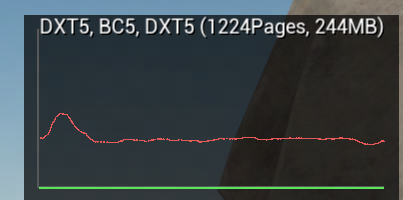
标题栏格式是 %s (%dPages, %dMB),这里的 DXT5, BC5, DXT5 就是这条池的三层格式,1224Pages / 244MB 是该池的固定总容量,也就是三条曲线的分母。
三条线的颜色定义在 VirtualTexturePhysicalSpace.cpp:298-300:
| 颜色 | 图例名 | 含义 |
|---|---|---|
🔴 红 (0.8, 0.1, 0.1) | Page Residency | NumVisiblePages / NumPages —— 工作集:锁定页 + 近 N 帧内被引用的页 |
🟡 黄 (0.8, 0.8, 0.1) | LockedPage Residency | NumLockedPages / NumPages —— 被钉死、不可驱逐的页,是红线的子集 |
🟢 绿 (0.1, 0.8, 0.1) | MipMap Bias | ResidencyMipMapBias / MaxMipMapBias —— 当前施加的降 mip 惩罚,归一化 |
❗ 绿线一旦离地,说明红线已经顶到 r.VT.Residency.UpperBound(0.95),系统在主动降分辨率保命——这时画面糊不是 mip 算错,是池不够。
图上的 1224Pages 和 r.VT.ListPhysicalPools 报的 Tiles= 1225 差 1,是因为 0 号页被保留:
// Engine/Source/Runtime/Renderer/Private/VT/TexturePagePool.h:31
uint32 GetNumPages() const { return FMath::Max(NumPages, NumReservedPages) - NumReservedPages; }
// TexturePagePool.cpp:10
const uint32 FTexturePagePool::NumReservedPages = 1u;
8.2 r.VT.ListPhysicalPools
dump 每个物理池的 tile 数、边长、MB、格式,是验证 §2.5 那套推导的权威手段:
PhysicalPool: [6] DXT5, BC5, DXT5 (264x264):
  SizeInMegabyte= 244.267273
  Dimensions= 9240x9240
  Tiles= 1225
  Tiles Allocated= 865 (172.482605MB)
  Tiles Locked= 1 (0.199402MB)
  Tiles Mapped= 864
...
Pool: [4] UInt16 (264x264) x 1:
  PageTableSize= 512x512
  Allocations= 1, 100% (0.666666MB)
TotalPageTableMemory: 0.885412MB
TotalPhysicalMemory: 493.614838MB
TotalLockedMemory: 0.420532MB
读这份输出的要点:
(264x264)是含 border 的物理 tile 尺寸,反推逻辑 TileSize =264 - 2×4 = 256Tiles Allocated/Tiles就是红线的分子分母,865 / 1225 ≈ 0.71Tiles Mapped可以大于或小于 Allocated:一个物理页能被多个页表项映射(§3.7 的FPageMapping链表)- 页表那部分(
Pool: [N] UInt16/UInt32)单独统计,UInt16vsUInt32直接印证 §2.3 的 ≤64 判据 TotalPageTableMemory通常不到 1 MB,TotalPhysicalMemory才是大头
8.3 其他调试命令
r.VT.DumpPoolUsage                  每个池里驻留着哪些 VT,以及各自占多少页
stat virtualtexturing               VT 系统的 CPU/GPU 计数器(含 Num Feedback Lost Buffers)
stat virtualtexturememory           VT 显存分项
r.VT.Borders / r.VT.Borders.Mip     给 tile 边框着色,肉眼看页边界与 mip 分布
r.VT.RenderCaptureNextPagesDraws    抓下一次(若干次)RVT page 渲染,见 §7.2
r.VT.DumpPoolUsage 的输出形如:
PhysicalPool: [5] G16 (264x264):
  RVT_Height 1 (1)
PhysicalPool: [6] DXT5, BC5, DXT5 (264x264):
  RVT_Material 886 (1)
后面的数字是”这条 VT 在该池里占了多少页 (有多少个 allocation)“。多条 RVT 共用一个池时,这里能一眼看出谁在吃预算。
九、强制更新手段与三个预算
9.1 什么会自动触发重新生产
| # | 触发源 | 代码路径 |
|---|---|---|
| 1 | 缺页(相机移动到新区域 / vLevel 变化) | Feedback → 非驻留分支 |
| 2 | Primitive 变动(移动、材质改、增删) | PrimitiveSceneInfo.cpp:2252 FlushRuntimeVirtualTexture() → SceneProxy->Dirty(Bounds) |
| 3 | 页面被 LRU 淘汰(物理池不够) | FTexturePagePool |
| 4 | Continuous update 开启 | GatherRequestsTask 里的 continuous 分支 |
❗ 第 2 条只对 bWritesRuntimeVirtualTexture 的 Primitive 生效,而且用的是 Primitive 的整个 Bounds。一个横跨半张地图的 RVT stamp 网格动一下,会脏掉一大片。
9.2 手段总表
| 手段 | 粒度 | 调用方式 | 效果 |
|---|---|---|---|
Invalidate(Bounds, Priority) | 区域 | Blueprint / C++ | 该区域页面失效,下帧起重画 |
RequestPreload(Bounds, Level) | 区域 + 指定 mip | Blueprint / C++ | 预热,不失效已有页 |
bContinuousUpdate | 单条 RVT | RVT Asset 属性 | 轮转刷新已映射页 |
r.VT.ForceContinuousUpdate 1 | 全局所有 VT | CVar | 同上,强制对所有 VT 生效 |
r.VT.Flush | 全局,核弹 | 控制台命令 | 清空所有物理缓存,全部重产 |
两个 API 都在 Engine/Source/Runtime/Engine/Classes/Components/RuntimeVirtualTextureComponent.h:165 / :173。
9.3 Invalidate() 的三个坑
链路:
Component::Invalidate
  → FScene::InvalidateRuntimeVirtualTexture         (ENQUEUE_RENDER_COMMAND)
  → FRuntimeVirtualTextureSceneProxy::Dirty         (累积 DirtyRects + CombinedDirtyRect)
  → 下一帧 BeginUpdate 里 FlushDirtyPages
  → FVirtualTextureSystem::FlushCache(ProducerHandle, SpaceID, Rect, MaxDirtyLevel, ...)
坑 1:Streaming Low Mips 的层级永远刷不掉
// Engine/Source/Runtime/Renderer/Private/VT/RuntimeVirtualTextureSceneProxy.cpp:118
// Any dirty flushes don't need to flush the streaming mips (they only change with a build step).
MaxDirtyLevel = TransitionLevel - 1;
只要配了 Streaming Low Mips,Invalidate 只作用于 TransitionLevel 以下的精细层。远景那几级粗 mip 来自预构建数据,只能重新跑 Build。「改了 Producer 材质但远景没变」就是这个原因。
坑 2:超过 2 个 dirty rect 会被合并成一个大矩形
// RuntimeVirtualTextureSceneProxy.cpp:241-244
bool bCombinedFlush = (DirtyRects.Num() > 2 || CombinedDirtyRect.Rect == FIntRect(0, 0, VirtualTextureSize.X, VirtualTextureSize.Y));
bCombinedFlush &= (CombinedDirtyRect.InvalidatePriority == EVTInvalidatePriority::Normal);
一帧里调 3 次 Invalidate 打三个分散的小区域,实际会退化成刷新这三个区域的外接矩形。要打散调用,请分帧。
坑 3:优先级默认就是 High
// RuntimeVirtualTextureComponent.h:165
ENGINE_API void Invalidate(FBoxSphereBounds const& WorldBounds,
                           EVTInvalidatePriority InvalidatePriority = EVTInvalidatePriority::High);
❗ 注意上面 bCombinedFlush 那行:只有 Normal 才允许合并。默认参数是 High,所以不显式传优先级的 Invalidate 调用天然绕开了矩形合并。这个设计的本意是让优先页保持少量,全都走 High 反而会让节流队列失去意义——要享受合并、降低节流压力,得显式传 EVTInvalidatePriority::Normal。
一个友好设计:r.VT.RVT.DirtyPagesKeptMappedFrames(默认 8)—— 最近 8 帧内用过的脏页不 unmap,只在原地更新,避免”unmap → feedback → 重新 map”造成的闪烁。
9.4 r.VT.Flush 的四个限定
// Engine/Source/Runtime/Renderer/Private/VT/VirtualTextureSystem.cpp:2874-2886
if (CVarVTProduceLockedTilesOnFlush.GetValueOnRenderThread())
{
    // Collect locked pages to be produced again
    ...AddOrMergeTileRequest(..., MappedTilesToProduce);
}
// Flush unlocked pages
PhysicalSpace->GetPagePool().EvictAllPages(this);| 限定 | 说明 |
|---|---|
| ① 只是 unmap,生成是被动的 | 清空后页面变成”非驻留”,要等下一帧 feedback 报告缺页才走加载→生产 |
| ② 只清 unlocked 页 | EvictAllPages 只遍历 FreeHeap;locked 页由 r.VT.ProduceLockedTilesOnFlush(默认 1)单独排产 |
| ③ 只重生成”看得见”的页 | feedback 驱动 —— 屏幕外的页清掉就没了 |
| ④ 不是一帧恢复 | 受 r.VT.MaxUploadsPerFrame 节流,游戏态默认只有 2 |
准确说法:Flush 是”一次性把缓存清空”,不是”一次性重画全部”。
9.5 ForceContinuousUpdate 为什么默认比 Flush 弱
// Engine/Source/Runtime/Renderer/Private/VT/VirtualTextureSystem.cpp:1944-1970
void FVirtualTextureSystem::GetContinuousUpdatesToProduce(
    FUniqueRequestList const* RequestList, int32 MaxTilesToProduce, int32 MaxContinuousUpdates)
{
    const int32 NumContinuousUpdateRequests = (int32)RequestList->GetNumContinuousUpdateRequests();

    // Negative maximum continous updates allows for uncapped requests
    if (MaxContinuousUpdates < 0)
    {
        for (int32 i = 0; i < NumContinuousUpdateRequests; ++i)
        {
            AddOrMergeTileRequest(RequestList->GetContinuousUpdateRequest(i), ContinuousUpdateTilesToProduce);
        }
    }
    else
    {
        const int32 MaxContinousUpdates = FMath::Min(MaxContinuousUpdates, NumContinuousUpdateRequests);

        int32 NumContinuousUpdates = 0;
        while (NumContinuousUpdates < MaxContinousUpdates && ContinuousUpdateTilesToProduce.Num() < MaxTilesToProduce)
        {
            // Note it's possible that we add a duplicate value to the TSet here, and so MappedTilesToProduce doesn't grow.
            // But ending up with fewer continuous updates then the maximum is OK.
            int32 RandomIndex = FMath::Rand() % NumContinuousUpdateRequests;
            AddOrMergeTileRequest(RequestList->GetContinuousUpdateRequest(RandomIndex), ContinuousUpdateTilesToProduce);
            NumContinuousUpdates++;
        }
    }
}
四个”没那么强”的原因:
- 候选集只有当前可见的已驻留页,不是整张 RVT 的全部页
- 每帧只挑
MaxContinuousUpdatesPerFrame个,游戏默认 1 - 是随机采样,不是轮转 —— Asset 属性描述写的是 round-robin,实现却是
FMath::Rand(),源码注释还承认可能挑到重复项导致实际更新数少于上限 - 只花剩余预算 —— 传的是
Updater->PageUploadBudgetRVT,即MaxUploadsPerFrame减掉本帧已用于加载新页之后的余额
9.6 语义差别
r.VT.Flush | ForceContinuousUpdate | |
|---|---|---|
| 页面是否 unmap | 全部 unmap | 保持 mapped |
| 过渡期表现 | 回落到粗父级页 → 可见变糊 / 跳变 | 原地更新 → 无视觉瑕疵 |
| 时序 | 一次性 | 每帧持续 |
| 范围 | 全部缓存(含屏幕外) | 当前可见页的随机子集 |
| 设计意图 | 重置 / 调试 | 修”页面生成时依赖贴图还没流送完” |
Flush 是”重置”,ContinuousUpdate 是”保鲜”。 两者不能互相替代。
9.7 负值才是真正的最强
MaxContinuousUpdates < 0 那条分支完全不检查 MaxTilesToProduce,预算限制被绕过:
r.VT.ForceContinuousUpdate 1
r.VT.MaxContinuousUpdatesPerFrame -1等于每帧重画所有可见页、无预算上限。比 r.VT.Flush 更狠(持续 vs 一次性),但也等于关掉了 RVT 的全部缓存收益,退化成”每帧重新渲染一遍地形材质”。
❗ 只适合做 A/B 对比或验证 Producer 材质改动,绝不能带进正式配置。
顺带一个量化技巧:分别在这个组合开 / 关的状态下量 GPU 时间,差值就是 RVT 每帧省下来的 Producer 材质成本。
9.8 三个预算的关系
r.VT.MaxUploadsPerFrame  (Game 2 / Editor 32)     ← 总预算,RVT 页上传
        │
        ├─ 先给"加载新页"(SortRequests 里扣掉)
        │
        └─ 剩下的余额 → 才轮到 continuous update
                            │
                            └─ 再被 r.VT.MaxContinuousUpdatesPerFrame (Game 1 / Editor 8) 卡一道
                               (负值 = 不卡,且连上面的余额也不检查)

r.VT.MaxTilesProducedPerFrame (Game 32 / Editor 500)  ← 另一条独立的产页上限
r.VT.MaxUploadsPerFrame.Streaming (Game 32 / Editor 500)  ← SVT 独立预算
❗ 游戏态 MaxUploadsPerFrame = 2 是最容易被忽略的瓶颈。开了 bContinuousUpdate 却发现完全没效果,十有八九是这 2 个额度全被”加载新页”吃光了。
⚠️ 编辑器档位是独立 CVar 名,不是同一个 CVar 换默认值:r.VT.MaxUploadsPerFrameInEditor、r.VT.MaxTilesProducedPerFrameInEditor、r.VT.MaxContinuousUpdatesPerFrameInEditor、r.VT.MaxUploadsPerFrameInEditor.Streaming。改错名字会一点效果都没有。全部定义在 Engine/Source/Runtime/Engine/Private/VT/VirtualTextureScalability.cpp。
9.9 MaxContinuousUpdatesPerFrame 的单位
单位是已经驻留(mapped)的虚拟纹理页 / tile,数据类型是 FVirtualTextureLocalTileRequest,内含 (ProducerHandle, vAddress, vLevel)。换算成截帧里看到的东西:
| 设 32 | 截帧里对应 |
|---|---|
| 32 个 tile | 32 个 VirtualTextureDraw pass |
每 8 个 tile 攒一批(MaxRenderPageBatch = 8) | 4 个 VirtualTextureCompress dispatch(GroupCount.Z = 8) |
❗ tile ≠ layer:RVT 如果是 BaseColor_Normal_Specular(3 层),一个 tile 的那次 VirtualTextureDraw 是 MRT 一次输出 3 张 RenderTexture0/1/2,仍然只算 1 个 tile。
十、坑点速查
| # | 坑 | 真相 |
|---|---|---|
| 1 | 「这帧画的页 = 这帧要用的页」 | 跨帧闭环,最短 2 帧、实际 3 帧起。第 N 帧画的是 N-3 帧的请求 |
| 2 | 「Feedback 是缺页才写」 | 无条件每帧写,第一职责是 LRU 保活,第二才是请求 |
| 3 | 「截帧没看到 VirtualTextureDraw 说明抓失败了」 | 稳态下就是 0 个。要先用 ForceContinuousUpdate 制造产页 |
| 4 | VirtualTextureUpdate 这个 stat 就是 RVT 开销 | 它只含 feedback 压缩回读。真正的生产成本挂在 VirtualTexture stat 下 |
| 5 | 空 scope 找不到 = 没执行 | VirtualTextureBeginUpdate / EndUpdate / Allocate 无 GPU pass 时会被 RDG 整个裁掉 |
| 6 | marker 层级是扁的 | r.RDG.Events 默认 1,分析 RVT 必须设 3 |
| 7 | 「batch 里的 8 个页应该挨着」 | 只在攒够 8 页或目标物理纹理变了时断批,源码注释明说不排序:This should never happen which is why we don't bother sorting to maximize batch size |
| 8 | 「粗 mip 是从 mip 0 降采样来的」 | 直接用正交视图重新光栅化更大的世界范围,不依赖细 mip |
| 9 | 「RVT 把源贴图 mip 0 烤进去了」 | 源贴图按本次页面绘制的导数各自选层,粗 mip 页里的源贴图也是粗的 |
| 10 | 「找到物理页后硬件会再选一次 mip」 | 逻辑 mip 查页表之前就定死了,SampleLevel/SampleGrad 只负责页内过滤 |
| 11 | 「改了 Producer 材质,远景没更新」 | 配了 Streaming Low Mips 时 Invalidate 只作用于 TransitionLevel 以下,粗 mip 要重跑 Build |
| 12 | 「Invalidate 的小矩形会被精确刷新」 | 超过 2 个 rect 会退化成外接矩形;而且默认优先级是 High,反而绕开了合并 |
| 13 | 「开了 bContinuousUpdate 就会持续刷新」 | 游戏态 MaxUploadsPerFrame = 2,额度常被新页加载吃光,一个都轮不上 |
| 14 | 「r.VT.Flush 会一次性重画全部」 | 只 unmap unlocked 页,重生成靠 feedback 被动驱动,且受每帧上传预算节流 |
| 15 | 「多条 RVT 的 VirtualTextureDraw 能按名字区分」 | pass 名是死字符串,只能靠 MipLevel cbuffer / RT 格式 / Compress CS 名反推 |
十一、参考链接
🔗 Epic 官方文档 - Virtual Texturing
🔗 Epic 官方文档 - Runtime Virtual Texturing
🔗 Epic 官方文档 - Streaming Virtual Texturing
🔗 Epic 官方文档 - Virtual Texture Memory Pools
🔗 Epic 官方文档 - Virtual Texturing Settings and Properties
🔗 Epic 知识库 - Understanding New Default Values For Virtual Texture Streaming Console Variables In UE 5.6
🔗 GDC 2015 - Adaptive Virtual Texture Rendering in Far Cry 4
🔗 Sean Barrett - Sparse Virtual Textures
🔗 RenderDoc 文档
🔗 UE4 VirtualTexture 源码解析